A live page you and your agent both edit.
The canvas is a Markdown file in your repo. Your agent edits the file. You edit the same page in a browser. Each side sees the other's changes as they happen, and each line shows who wrote it.
View on GitHub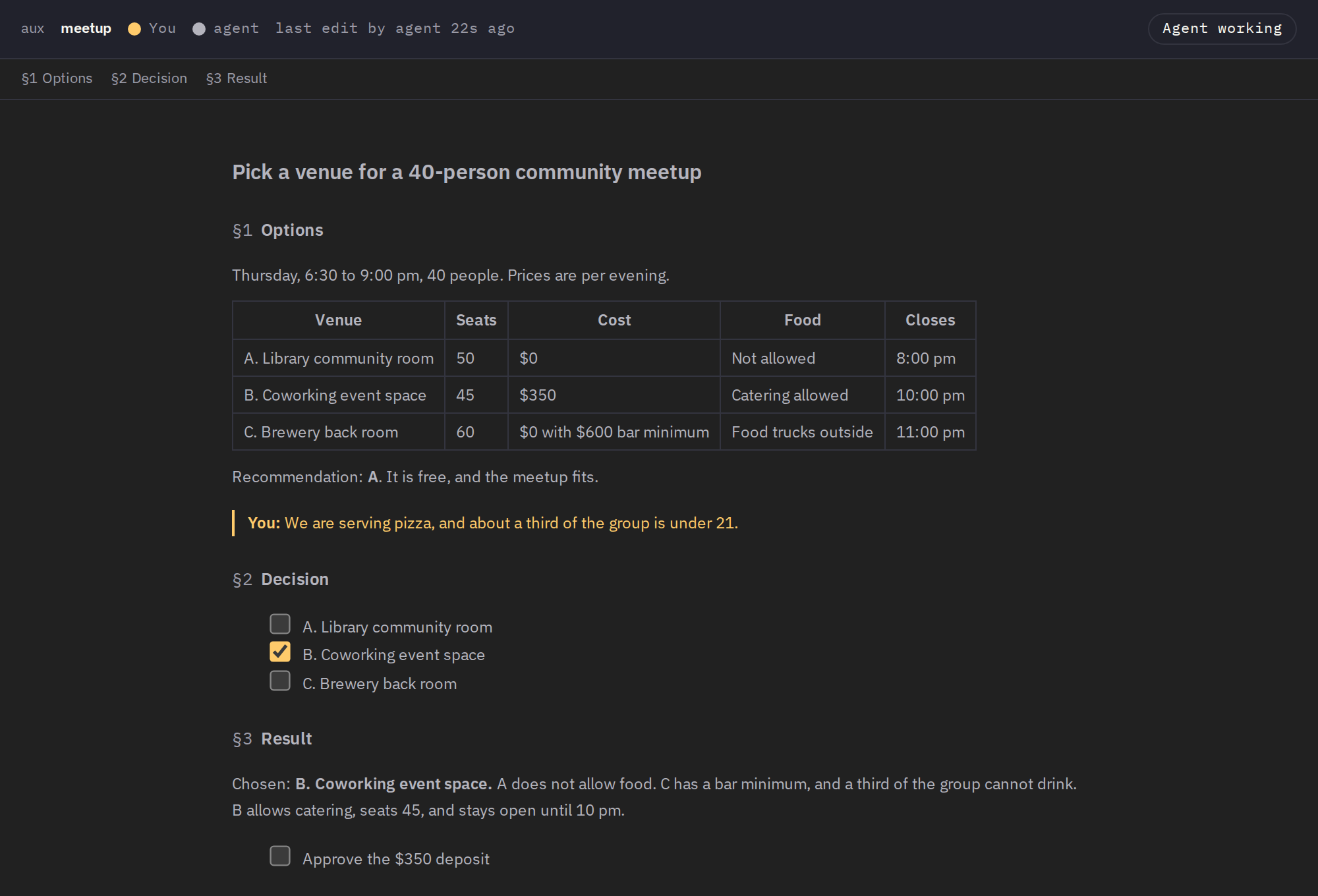
wait handed the agent that line as a diff, and the agent changed its pick and wrote the result. The venues are made up for this demo.The file is the database
Each canvas is .aux/aux.md in a project folder, or .aux/<name>.md for a second topic. Images and HTML files sit beside it. A small .aux/.state/ folder keeps who wrote each line and what the agent has read. There is no account and no sync service.
The rule for authorship is simple. A change saved through the browser is the person's. Any other change to the file is the agent's.
Quickstart
One Python file with no dependencies beyond the standard library. Its script header tells uv which Python to use. The page loads its fonts and libraries from the same server, so it makes no outside requests.
git clone https://github.com/SCTY-Inc/aux && cd aux
uv run aux.py init meetup
uv run aux.py serve --host 127.0.0.1 --port 7860 --root .
uv run aux.py wait meetup
Run the first three lines in one terminal and open http://127.0.0.1:7860/a/meetup. Run wait in a second terminal, as your agent would. When you save in the browser, wait prints your changes as a diff. Needs uv, which fetches Python 3.10 or later if you do not have it. Runs on macOS or Linux. The server has no authentication, so keep it on your own machine or a private network.
Why
Can a person and an agent work on one page without either one losing the other's edits?
Chat scrolls away, and a status report goes stale the moment it is sent. A file both sides can edit stays where the work is. In the example above, the agent laid out the options and the evidence. The person added one fact the agent could not know. The agent got exactly that line as a diff, changed its answer, and wrote the reason next to the options. In a chat, that correction would sit below the table and the table would still say A.
The status bar was the part that failed. It took three fixes on the same day to stop it showing "agent working" after the agent had stopped. Now it says "Not listening" unless a wait is running, so the person knows to send a message instead. A later fix made saves safe while both sides edit: the server refuses a browser save when the agent changed the file after the person's copy loaded.
If you delete it tomorrow, you lose nothing
Your canvases stay ordinary Markdown files that any editor can open. You lose the browser view, the colors that show who wrote each line, and the read marks in .aux/.state/. The canvas is working space. Move each settled decision to where it belongs, such as a commit or a document, and clear it from the page.